Docker Security Under the Hood: Runtime Security Model Explained
Introduction
Container security has improved significantly over the past decade, yet the advice surrounding it has not.
If you search for Docker security best practices, you will come across some recommendations like this:
- Don't run as a root user.
- Use a read-only file system.
- Enable seccomp
- Never run a container as privileged.
These recommendations are solid and should be followed. However, these are often represented as rules to follow rather than being explained as concepts that you can properly understand.
One of my favorite resources for security best practices is the OWASP Docker Cheat Sheet. This cheat sheet contains excellent suggestions as to how to secure your containerized application. However, it never explains why these measures are necessary and what problems they could prevent. This post builds on this cheat sheet as a foundation by explaining the Linux security mechanism behind these suggestions and how they could prevent certain types of attacks. By the end of this post, you'll understand why these options matter and where to apply each of them effectively.
Threat Model
Before we discuss these features, a question pops up that we need to answer:
Who are we defending against?
It is only in the context of a threat model that security advice makes sense. A container running on a development machine has different security requirements compared to a public-facing production API.
For the rest of the post we will assume the following scenario:
- The application inside the container is running in a production environment.
- The application is exposed to an untrusted user over an untrusted network.
- Due to vulnerability in the program, the attacker has acquired remote code execution (RCE) inside the container.
- The attacker can now run arbitrary commands with the same privileges as the application process, which is not intended by the developer.
In the current situation, the issue is not that Docker has failed. Rather, Docker runtime security features start to shine here after the compromise happens. Preventing certain types of vulnerabilities such as SQL injection, command injection, or insecure deserialization is not the responsibility of Docker. The developer is responsible for preventing these types of vulnerabilities.
The attacker’s goals could be:
- Read sensitive data such as API keys, important credentials, or application secrets.
- Change the application or its configuration
- Maintain persistence and survive container or application restarts
- Privilege escalation within the container
- Escape from the container and compromise the host.
- Accessing or modifying other containers inside the network
- Using excessive resources, triggering a denial of service attack
The purpose of these security features is to limit attackers after a successful compromise. Any of these goals should be difficult, or better yet, impossible.
Example from the Real World
A typical scenario that occurs annually is the discovery of remote code execution vulnerabilities in containerized applications. Take the React Server Component vulnerability in 2025 (CVE-2025-55182) for example. It was originally a React vulnerability; however, it impacted Next.js applications, and attackers were able to execute arbitrary code on the server by crafting a malicious HTTP request.
Now imagine your application is running in a Docker container and using a vulnerable version of Next.js, giving an attacker the ability to run malicious code inside your container.
Now ask yourself:
- Can they modify your application?
- Can they steal mounted secrets?
- Can they achieve persistence?
- Can it access other containers?
- Can they escape to the host?
- Can they drain the host's resources?
These are the questions Docker's security features covered in this post are designed to answer.
The Docker Security Boundary
To understand what exactly Docker can and cannot protect against, first you need to understand how Docker fits in the system stack:
In this stack, Docker's responsibility starts from the Docker Engine layer up to the Container layer. It manages container life cycles, namespaces, capability sets, seccomp profiles, LSMs, and cgroups.
What Docker does not provide is a security boundary against the Linux kernel. The kernel is shared between all containers on a host. While Docker configures kernel security mechanisms, it does not add a new layer for security on top of them.
If a vulnerability already exists in a kernel subsystem, for example, OverlayFS, eBPF, io_uring, or any other subsystem, the attacker can bypass Docker's isolation entirely, assuming they can interact with that subsystem. These are not exactly misconfigurations but rather kernel bugs that Docker can't patch. Many of the most impactful recent container escapes have kernel vulnerabilities, rather than Docker misconfigurations, that have enabled them. Many of the most impactful recent container escapes have been enabled by exploiting kernel vulnerabilities rather than Docker misconfiguration. For example, CVE-2023-0386 was a container escape exploiting against OverlayFS file system, allowing the attacker to gain root access to the host via a malicious filesystem mounted inside the container.
This doesn't mean Docker is insecure. It means that container security is ultimately Linux security. Throughout this post we will discuss some mitigation that will reduce the impact of compromised containers.
Running Containers as a Non-Root User
Among all the advice suggested for Docker security, probably the most common one is to not run your container as root. While it is a good recommendation, it's also a misunderstood one. The question is, if containers are isolated, then why does it even matter if we run application containers as root or not?
Short answer: While the container root is not the same as the host's root, it still has much more privilege inside the container compared to that of a normal user. Understanding these privileges is key to understanding why running as a non-root user is a fundamental container hardening practice.
Root inside a container is not the same as host root.
On a traditional Linux system, the root user has a user ID of zero (UID 0) and has unrestricted access to almost every part of the operating system. However, containers' security model applies some changes. Unlike a traditional Linux system, UID 0 inside a container does not really mean unrestricted control over the host; it means the user is only considered root inside that specific container's namespace.
For example, a root process inside Docker is unable to do any of the following:
- Load a kernel module
- Mount any filesystem
- Modify kernel parameter
- Change system clock
- See or control process outside container or host
These operations require privileges that Docker intentionally restricts for the root user inside a container. However, even with all restrictions applied to the root user inside the container, it is still the most privileged user inside the container.
Why Kubernetes Recommends runAsNonRoot
If you have ever deployed applications on Kubernetes, you might have encountered the following suggestion:
securityContext:
    runAsNonRoot: true
These settings tell the Kubelet to make sure containers do not start with UID 0. Now assuming your image is configured to run as root, kubernetes refuses to start the container. The reason for refusal is not that Kubernetes doesn't trust Docker security isolation. Most applications won't even need root access to serve HTTP requests, process jobs, or interact with the database.
Container Escapes and Why They Matter
Although rare, sometimes vulnerability in the Linux kernel will lead to container escape, which allows the attacker to execute code on the host. One of the famous examples of this was CVE-2019-5736, which allowed a root user from inside the container to escape the container by replacing the host's runC binary, which is the Docker container runtime.
Note that while running applications as a non-root user will not prevent container escapes from ever happening, it does reduce the attack surface and the attacker's privilege, thus making it harder than if the application were running as a root user.
This type of attack won't happen by bypassing Docker's configuration at all but rather will happen due to vulnerabilities in the kernel itself.
User Namespaces
Earlier we mentioned that the root user inside a container is not the same root user as the host. This separation is possible thanks to a feature in the Linux kernel named "user namespace." It maps user and group IDs between container and host. For example, a process running as UID 0 inside the container would be mapped to UID 100000 on the host.
Here's how the remapping works:
| Inside the container | On the host |
|---|---|
| UID 0 (root) | UID 100000 |
| UID 1 | UID 100001 |
| UID 1000 | UID 101000 |
This means even if the root user of the container tries to access a file that's owned by the host root, it will fail since, from the kernel's standpoint, the container user is not root.
User namespaces are powerful, but not enabled by default in many Docker installations. The main concern is compatibility: bind mounts, file ownership mapping, and some storage backends act differently when UIDs are remapped. Some images assume they can write files as root that will be owned by root on the host, which breaks under user namespace remapping. These are solvable problems, but they require configuration and testing that many deployments don't invest in.
For production environments where security requirements are high, enabling user namespaces should be a priority. The protection they provide against container escape impact is difficult to achieve through any other single mechanism.
Linux Capabilities
If running containers as a non-root user is the first step toward reducing privileges, Linux capabilities are the second.
In fact, even if your application runs as root inside a container, it still doesn't possess the same privileges as root on a traditional Linux system. That's because modern Linux no longer treats root as an all-or-nothing concept. Instead, it breaks privileged operations into a collection of discrete capabilities.
Why Linux Split Root Into Capabilities
Historically, Unix had only two privilege levels. You are either a root user (UID 0) and have unrestricted access to the system or a normal user, and there are restrictions. This model, while simple, was often too coarse. Consider a web server like Nginx. If Nginx wants to bind to port 80 or 443, it needs root access. This operation needs root access. But granting all access to Nginx was not needed. Nginx doesn't need to load kernel modules or reboot the system. With this model, Nginx with root access will be granted power that is more than necessary.
Linux capabilities are a solution to this problem. They separate root privileges into individual permissions. Each of these permissions allows a specific privileged operation, allowing access only to permissions that are actually needed.
For example, these are some of the common capabilities defined in Linux:
| Capability | Allows |
|---|---|
CAP_NET_BIND_SERVICE | Bind to ports below 1024 |
CAP_NET_ADMIN | Configure network interfaces, routing tables, firewall rules, and more |
CAP_SYS_PTRACE | Trace or debug other processes |
CAP_SYS_MODULE | Load and unload kernel modules |
CAP_SYS_TIME | Modify the system clock |
CAP_SYS_ADMIN | Perform a broad range of administrative operations |
Docker's Default Capability Set
When you start a container, Docker itself already drops some of the capabilities that were problematic and dangerous. You can inspect the capabilities defined by Docker's default policy for capabilities inside a container:
docker run --rm alpine sh -c "
apk add --no-cache libcap >/dev/null
capsh --print
"
Let's also investigate the output:
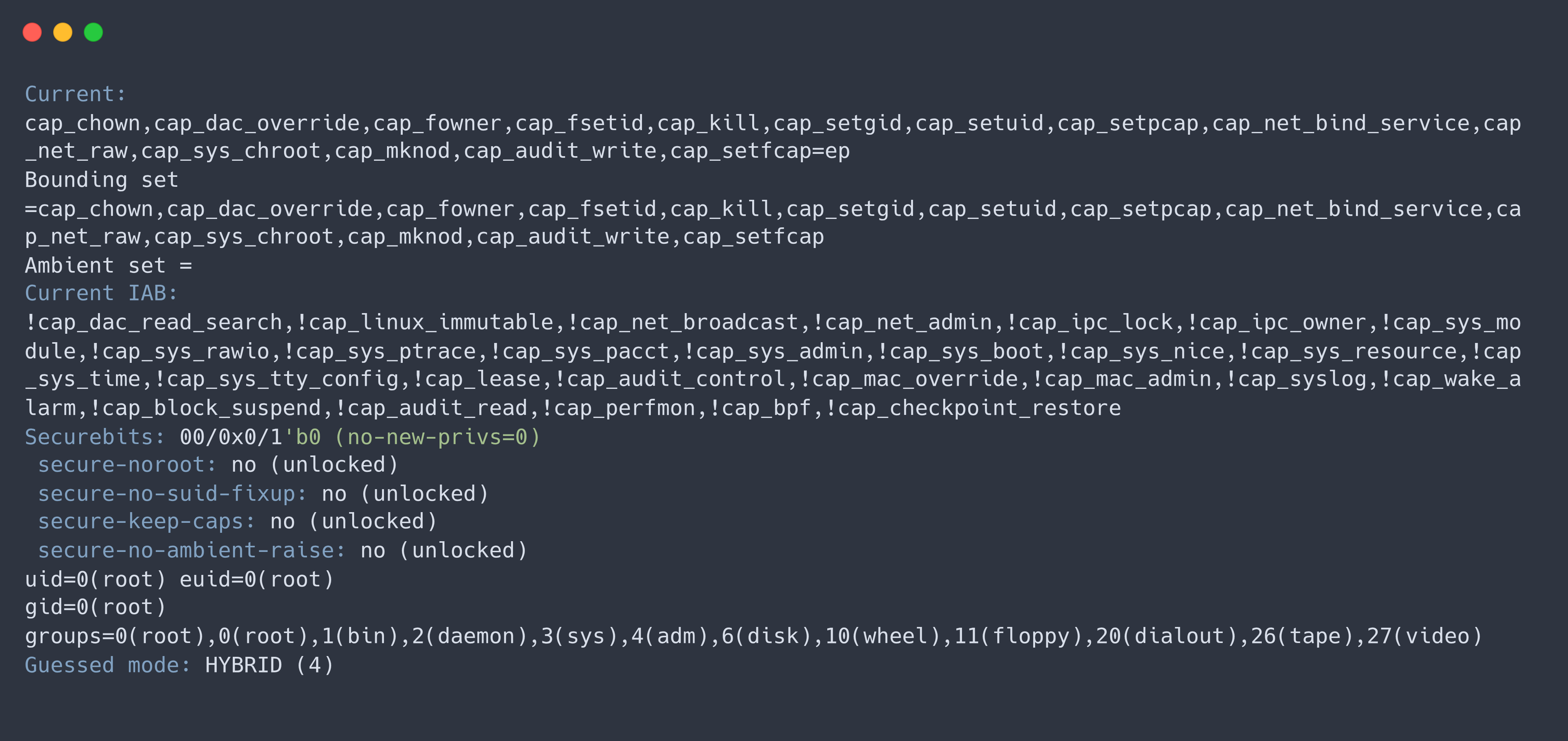
You'll notice that capabilities such as CAP_SYS_MODULE, CAP_SYS_BOOT, CAP_SYS_ADMIN, and CAP_SYS_TIME are absent. This is why a root process inside a default Docker container cannot perform many operations that host root can.
Dropping Capabilities with --cap-drop
If even Docker's default set of capabilities is more than your application needs, you can drop more. The --cap-drop flag lets you remove individual capabilities or all of them at once.
docker run --cap-drop ALL nginx
In Docker Compose:
services:
  nginx:
    image: nginx:latest
    cap_drop:
      - ALL
This ensures the container starts with the minimum privileges possible.
Adding Capabilities with --cap-add
Suppose you want to allow a certain capability now, like CAP_NET_BIND_SERVICE for Nginx to allow serving ports 80 or 443.
Instead of allowing broad privileges, you can allow that certain capability:
docker run \
--cap-drop ALL \
--cap-add NET_BIND_SERVICE \
nginx
Or in Docker Compose:
services:
  nginx:
    image: nginx:latest
    cap_drop:
      - ALL
    cap_add:
      - NET_BIND_SERVICE
This way is much safer than allowing all capabilities.
Why CAP_SYS_ADMIN Is the new root
Among all Linux capabilities, one stands out, and that is CAP_SYS_ADMIN. If you have spent any time reading kernel docs or security advisories, you probably encountered this phrase:
CAP_SYS_ADMINis the new root.
Unlike other capabilities that allow a certain operation and are narrowly scoped, CAP_SYS_ADMIN allows a lot of administrative operations that are not truly related.
Processes with this capability are allowed to:
- Mount and unmount filesystems.
- Perform namespace operations.
- Configure certain kernel interfaces.
- Execute privileged filesystem operations.
- Interact with eBPF and other advanced kernel features (depending on the kernel version).
Over the years, many vulnerabilities or container escapes have attempted to obtain this capability, which is why allowing it needs extreme caution. If your app doesn't need it, don't add it. Simple as that.
CAP_NET_ADMIN: More Powerful Than It Sounds
Another one that people get wrong is CAP_NET_ADMIN. Despite the name, it's not just about administering networking. It's way more than that.
With this capability you can:
- Create or modify network interfaces.
- Configure routing tables.
- Manage firewall rules.
- Enable packet forwarding.
- Change network namespaces.
- Configure traffic control (tc).
Now this is fine if you're running a VPN server, a CNI plugin, or something like that. But for a typical web app that just serves HTTP? You don't need it. Granting CAP_NET_ADMIN to an app like that is just giving the attacker more options if they get in.
Privileged Containers
--privileged is not a capability. It's a flag that says "give me everything", almost every Linux capability, host device access, relaxed cgroup restrictions, disabled safety mechanisms. People use it as a troubleshooting shortcut: something doesn't work, they slap --privileged and move on. Instead, figure out what's actually needed, a specific capability? Access to /dev/net/tun? Granting one permission is always better than granting everything. Reserve --privileged for low-level infrastructure like container runtimes or debugging tools, not your web app, API, or background workers.
Read-Only Filesystems
By default, a container's root filesystem is writable. So any process inside, including one controlled by an attacker, can create, modify, or delete files wherever permissions allow.
For a lot of apps, this isn't necessary. A web server reads code, serves requests, maybe writes logs or cache. It rarely needs to modify its own binaries.
Docker lets you mount the root filesystem as read-only.
Docker:
docker run --read-only nginx
Docker Compose:
services:
  app:
    image: my-app:latest
    read_only: true
Kubernetes:
securityContext:
  readOnlyRootFilesystem: true
With this, any attempt to modify the container's files fails. Even if the process has file permissions to write. It becomes an immutable environment.
This prevents an entire class of post-exploitation techniques that rely on modifying the filesystem. Without write access, an attacker cannot replace your application binary with a backdoored version, tamper with configuration files to disable security controls, or install persistence mechanisms like cron jobs, systemd services, or startup scripts. They cannot download malware to disk, drop a web shell into the document root, or overwrite shared libraries for LD_PRELOAD-style hijacking. Even with full code execution, the attacker cannot permanently alter the container's state. Any changes are lost when the container restarts.
Temporary Writable Storage with tmpfs
Of course, most apps need somewhere to write temporary stuff. Like /tmp, runtime sockets, PID files, uploads, caches.
Instead of making the whole filesystem writable, Docker lets you mount specific paths as tmpfs (in-memory).
Docker:
docker run --read-only --tmpfs /tmp my-nextjs-app:latest
Docker Compose:
services:
  nextjs:
    image: my-nextjs-app:latest
    read_only: true
    tmpfs:
      - /tmp
Kubernetes:
volumes:
  - name: tmp
    emptyDir:
      medium: Memory

containers:
  - name: nextjs
    volumeMounts:
      - name: tmp
        mountPath: /tmp
A tmpfs mount is in memory. Anything written there disappears when the container stops. So apps get their temporary space without allowing permanent modifications.
Writable Paths Should Be Explicit
One big advantage of read-only filesystems is that it forces you to think. Where does my app actually need to write? Instead of allowing writes everywhere, you define the few places that need it.
For example:
/tmpfor temporary files./var/logif writing logs to disk./uploadsfor user-uploaded content.
Everything else stays immutable. This reduces the attack surface significantly.
What a Read-Only Filesystem Does NOT Prevent
A read-only root filesystem only blocks writes to disk. It does not prevent the initial exploit, stop code execution, or restrict what a process can do in memory. An attacker with RCE can still exfiltrate data, spawn reverse shells, attack other services, or abuse kernel interfaces, as long as those operations don't require writing to disk.
For example, Sysdig has documented how attackers use memory-backed filesystems like /dev/shm to download and execute malware entirely in RAM, leaving no traces on disk. This technique, called fileless malware, completely bypasses read-only filesystem restrictions. The malware runs, does its damage, and disappears when the container stops, no files ever touched.
Preventing Privilege Escalation with no-new-privileges
So we've talked about reducing what the container starts with. But what if the process tries to gain more privileges after it's already running?
On Linux, there are ways to do this. The most common are setuid binaries and file capabilities.
The kernel has a feature called No New Privileges (NNP) to stop this.
Docker:
docker run --security-opt no-new-privileges:true my-app:latest
Docker Compose:
services:
  app:
    image: my-app:latest
    security_opt:
      - no-new-privileges:true
Kubernetes:
securityContext:
  allowPrivilegeEscalation: false
Once this is on, the kernel guarantees the process can't gain privileges it didn't already have. No matter what executable it runs. This is one of the simplest and most effective things you can do.
Understanding setuid
Linux files can have a special permission called setuid. Normally a program runs with the privileges of whoever executes it. A setuid program runs with the privileges of the file owner instead.
Take the passwd utility. It needs to modify /etc/shadow, which is only writable by root. Instead of making every user root, Linux marks passwd as setuid, so it temporarily runs with root privileges.
This is useful, but it's also a privilege escalation opportunity. If an attacker finds a vulnerable setuid binary, they might get privileges they shouldn't have.
With no-new-privileges enabled, the kernel ignores the setuid bit. The program still runs, but it doesn't get elevated privileges.
File Capabilities (setcap)
Capabilities can also be attached directly to executable files using setcap:
setcap cap_net_bind_service=+ep /usr/local/bin/my-server
This lets the binary bind to privileged ports without running as root. But with no-new-privileges, those extra capabilities are not acquired during execution.
Example: PwnKit
A real example is PwnKit (CVE-2021-4034). It affected pkexec, a setuid-root utility on most Linux distributions. A bug let any unprivileged local user get a root shell.
Now imagine our compromised Next.js app. The attacker finds pkexec and tries to exploit it.
Without no-new-privileges, the kernel honors the setuid bit. If the exploit works, the attacker gets root. With no-new-privileges, the kernel refuses to grant the extra privileges. The attacker can still run pkexec, but it runs with their existing privileges. No privilege escalation.
Just to be clear, no-new-privileges is not a universal defense against every LPE vulnerability. It specifically blocks new privileges through setuid and file capabilities during execve().
Seccomp: Restricting System Calls
Even after dropping capabilities and preventing privilege escalation, a compromised process can still call Linux system calls.
Everything a userspace program does with the kernel goes through a syscall. Reading a file, opening a socket, creating a process, allocating memory. All of it.
Seccomp lets you control which syscalls a process can make. Modern Linux has hundreds of syscalls. mount(), bpf(), ptrace(), powerful kernel interfaces that most apps never need.
Docker's Default Seccomp Profile
Docker applies a seccomp profile to every container by default. It blocks high-risk syscalls that ordinary apps rarely need.
But here's the thing. Docker's default profile is intentionally permissive. It blocks things that are clearly dangerous, but it's not a strict whitelist. Most syscalls are still allowed. This is because a more restrictive default would break things.
In high-security environments, you should treat the default profile as a starting point, not the final config. Custom profiles that whitelist only the syscalls your app actually uses are much stronger.
How to Actually Configure Seccomp
Now this is where Iman was right, just saying "enable seccomp" without telling people how is not helpful. So here's how you do it.
Docker lets you apply a custom seccomp profile with --security-opt:
docker run --security-opt seccomp=/path/to/profile.json my-app
The profile is a JSON file that defines which syscalls to allow or deny. If you want to disable seccomp (not recommended), use unconfined:
docker run --security-opt seccomp=unconfined my-app
To build a custom profile, you can use tools like strace or auditd to record what syscalls your app makes during normal operation, then create a whitelist from that. Docker's official documentation at https://docs.docker.com/engine/security/seccomp/ has the full reference for the profile format and examples.
Docker Compose:
services:
  app:
    image: my-app:latest
    security_opt:
      - seccomp:/path/to/profile.json
Kubernetes:
apiVersion: apps/v1
kind: Deployment
metadata:
  name: app
spec:
  template:
    spec:
      containers:
        - name: app
          image: my-app:latest
          securityContext:
            seccompProfile:
              type: Localhost
              localhostProfile: profiles/seccomp.json
Kubernetes also supports RuntimeDefault which just uses the container runtime's default:
securityContext:
  seccompProfile:
    type: RuntimeDefault
Dangerous System Calls
Some syscalls have been involved in a lot of vulnerabilities over the years:
ptrace(): debugging other processes.mount(): manipulating filesystems.bpf(): interacting with eBPF.userfaultfd(): involved in multiple privilege escalation bugs.- Certain namespace-related syscalls.
These are powerful and unnecessary for most web apps. Blocking them removes a whole class of post-exploitation techniques.
A Real-World Scenario
There's a tool called Snoopy that abuses eBPF for container escape and privilege escalation. Attackers with code execution inside a container can use bpf() to hook kernel functions, bypass security mechanisms, and escalate privileges. If bpf() is blocked by seccomp, the kernel denies the request immediately.
The attacker still has code execution, but they can't freely access every kernel interface.
This is why you combine layers. Removing CAP_SYS_ADMIN limits eBPF access. Blocking the bpf() syscall at the seccomp level is a second layer. Even if one layer fails, the other is still there.
AppArmor and SELinux
So we've covered capabilities (what privileged operations you can do) and seccomp (which syscalls you can call). There's a third layer: Linux Security Modules, or LSMs.
AppArmor and SELinux are the two main ones. They answer a different question:
Even if a process has the right capability and the right syscall, what files, directories, network resources can it actually access?
Capabilities say what you can do. Seccomp says which kernel APIs you can call. LSMs say which objects you can touch.
What LSMs Do
An LSM is a kernel framework that enforces security policies on every security-sensitive operation. When a process opens a file, binds to a socket, or accesses a directory, the LSM checks its policy.
AppArmor uses path-based policies. You write something like "this binary can read /etc/nginx/nginx.conf but can't write to it" or "this binary can't create network sockets at all."
SELinux uses label-based policies. Every process and object gets a security label, and the policy defines which labeled processes can access which labeled objects. SELinux is more powerful but also more complex. That's why you see it more in government and high-security environments.
How Docker Uses LSMs
Docker can attach an AppArmor profile or SELinux context to container processes. It ships with a default AppArmor profile that restricts access to sensitive host paths. It's applied automatically if AppArmor is loaded on the host.
SELinux support is available but needs the host to be running SELinux (most common on RHEL/CentOS/Fedora) and the selinux-enabled flag configured in the Docker daemon.
How They Work Together
Each mechanism answers a different question:
- Capabilities: "What privileged operations can I do?"
- Seccomp: "Which kernel APIs can I call?"
- LSMs: "Even if I can call it, what objects can I access?"
They're complementary. A process might have CAP_NET_BIND_SERVICE and seccomp might allow bind(), but AppArmor can still block it from binding to a specific port or interface. Each one constrains a different dimension.
None of these alone is enough. Together, they create defense in depth where an attacker has to bypass multiple independent restrictions.
Rootless Docker
Rootless Docker runs the daemon and containers without root privileges on the host. It uses user namespaces (the same thing we discussed earlier) but goes further by running the Docker daemon itself as an unprivileged user.
The difference is scope. With standard user namespace remapping, only container processes are remapped. The daemon still runs as root. With rootless mode, the whole stack (daemon, containerd, runc) runs without host root.
Rootless Docker has limitations. Can't bind to ports below 1024 (though tools like authbind can work around it), limited storage driver support, and doesn't work with all network configs.
For environments that want extra host-level isolation, it's a good option. For most production deployments, standard user namespaces plus the other hardening measures here give you plenty of protection.
Docker Daemon Security
Docker's security model isn't just about containers. The daemon itself is a critical boundary.
The docker Group Is Root
On systems with Docker, users can be added to the docker group to run commands without sudo. Convenient, but here's the thing: membership in the docker group is equivalent to root on the host.
Why? A user in the docker group can:
- Start containers with any capability, including
--privileged. - Mount any host directory into a container with full read-write access.
- Access the Docker API socket directly.
- Modify Docker's configuration.
Any process that has access to the Docker socket effectively has root access.
Mounting /var/run/docker.sock Into a Container
A common anti-pattern is mounting the Docker socket into a container. People do this so the container can manage other containers (CI/CD agents, monitoring tools, etc.).
services:
  container-manager:
    image: my-manager:latest
    volumes:
      - /var/run/docker.sock:/var/run/docker.sock
This gives that container's processes the same privileges as someone in the docker group. If an attacker compromises that container, they can start new containers, mount host filesystems, and get full host-level access. All without even escaping the container.
If you need Docker access from a container, consider using the Docker API over TLS with client certificates, or a security-aware proxy that exposes only specific operations.
Resource Abuse
Not every attack is about privilege escalation. Sometimes the attacker just wants to make your app unavailable.
Imagine our compromised Next.js app. Instead of trying to escape, the attacker runs an infinite loop, allocates tons of memory, or spawns thousands of child processes.
These attacks don't need elevated privileges. They just abuse container resources.
Docker uses cgroups (Control Groups) to limit CPU, memory, and process creation.
Memory Limits
Without memory limits, one compromised container can eat all the RAM on the host and affect every other workload.
Docker Compose:
services:
  nextjs:
    image: my-nextjs-app
    deploy:
      resources:
        limits:
          memory: 512M
Kubernetes:
resources:
  requests:
    memory: "256Mi"
  limits:
    memory: "512Mi"
If the process goes over the limit, the OOM killer terminates it.
Process Limits (pids_limit)
Fork bombs are another common DoS technique. A process keeps creating child processes until the system can't create new ones.
Docker lets you limit how many processes a container can create.
services:
  nextjs:
    image: my-nextjs-app
    pids_limit: 100
Even with code execution, the attacker can't create more processes than the limit.
CPU Limits
CPU exhaustion is also a thing. Setting CPU limits makes sure one compromised container can't hog all processors.
Docker Compose:
services:
  nextjs:
    image: my-nextjs-app
    deploy:
      resources:
        limits:
          cpus: "1.0"
Kubernetes:
resources:
  requests:
    cpu: "500m"
  limits:
    cpu: "1"
These limits don't prevent abuse. They contain it.
Device Access
By default, Docker isolates containers from host hardware. On Linux, hardware resources are exposed as files under /dev. Giving access to one of these often means giving access to a kernel-managed interface.
Common examples:
- NVIDIA GPUs for ML/AI inference.
/dev/net/tunfor VPNs like WireGuard or OpenVPN.- HSMs for cryptographic key management.
- USB or serial devices for industrial/IoT.
For example, WireGuard needs the TUN device:
services:
  wireguard:
    image: linuxserver/wireguard
    devices:
      - /dev/net/tun:/dev/net/tun
    cap_add:
      - NET_ADMIN
Instead of exposing the whole /dev directory or using --privileged, just grant the specific device your workload needs. Same principle as everything else in this post: expose only what's needed, nothing more.
Putting It All Together
So we've looked at all these Docker security features individually. But they're not meant to be used alone. They work together.
Let's go back to our threat model.
An attacker exploits a vulnerability in our Next.js app and gets RCE inside the container.
Now every hardening measure kicks in:
- The app runs as a non-root user.
- All unnecessary capabilities are dropped.
- Root filesystem is read-only.
- Temp files go to tmpfs.
- Privilege escalation is disabled.
- CPU, memory, and PID limits are in place.
- Only minimum resources are exposed.
None of this prevents the initial exploit. But together, they reduce what the attacker can do after getting in.
Here's what a production setup might look like for Next.js behind Nginx.
Docker
docker network create web

docker run -d \
  --name nextjs \
  --network web \
  --user 1000:1000 \
  --read-only \
  --tmpfs /tmp \
  --cap-drop ALL \
  --security-opt no-new-privileges:true \
  --memory 512m \
  --cpus 1 \
  --pids-limit 100 \
  my-nextjs-app:latest

docker run -d \
  --name nginx \
  --network web \
  -p 80:80 \
  --read-only \
  --tmpfs /var/cache/nginx \
  --tmpfs /var/run \
  --cap-drop ALL \
  --cap-add NET_BIND_SERVICE \
  --security-opt no-new-privileges:true \
  nginx:latest
Docker Compose
services:
  nextjs:
    image: my-nextjs-app:latest
    user: "1000:1000"
    read_only: true
    tmpfs:
      - /tmp
    cap_drop:
      - ALL
    security_opt:
      - no-new-privileges:true
    pids_limit: 100
    deploy:
      resources:
        limits:
          cpus: "1.0"
          memory: 512M

  nginx:
    image: nginx:latest
    ports:
      - "80:80"
    read_only: true
    tmpfs:
      - /var/cache/nginx
      - /var/run
    cap_drop:
      - ALL
    cap_add:
      - NET_BIND_SERVICE
    security_opt:
      - no-new-privileges:true
Kubernetes
apiVersion: apps/v1
kind: Deployment
metadata:
  name: nextjs
spec:
  replicas: 1
  selector:
    matchLabels:
      app: nextjs
  template:
    metadata:
      labels:
        app: nextjs
    spec:
      containers:
        - name: nextjs
          image: my-nextjs-app:latest
          securityContext:
            runAsNonRoot: true
            allowPrivilegeEscalation: false
            readOnlyRootFilesystem: true
            capabilities:
              drop:
                - ALL
          resources:
            requests:
              cpu: "250m"
              memory: "256Mi"
            limits:
              cpu: "1"
              memory: "512Mi"
          volumeMounts:
            - name: tmp
              mountPath: /tmp
      volumes:
        - name: tmp
          emptyDir:
            medium: Memory
Don't just copy these verbatim. Every workload is different. The point is the mindset: remove what you don't need, expose only what's required, assume the app will eventually be compromised.
Conclusion
Docker security is defense in depth, not a silver bullet. Non-root users, capabilities, read-only filesystems, no-new-privileges, seccomp, LSMs, cgroups, device restrictions. Each one removes a piece of attack surface. Alone they're useful. Together they make post-exploitation much harder.
Docker won't stop your app from getting compromised. What it does is limit what the attacker can do after they get in. And that distinction matters. Every unnecessary permission, writable directory, or exposed device is an opportunity you didn't need to give them.
Security isn't about making compromise impossible. It's about making sure when it happens, the attacker has as few options as possible.